Coaching clients come from Instagram when three things work together: posts aimed at one specific person, an easy next step when someone comments or messages, and a quick follow-up with people who visit your page. You can do this by hand in a few hours a week, or hand most of it to AI agents and spend your time on calls.
What it takes by hand
You can do all of this yourself with any tools. These are the five steps.
- Pick one client type and one offer. Name the person you help and the one result you sell, so every post speaks to them.
- Post 3 times a week answering their questions. Each post answers one question your client asks before they buy, and ends with one next step.
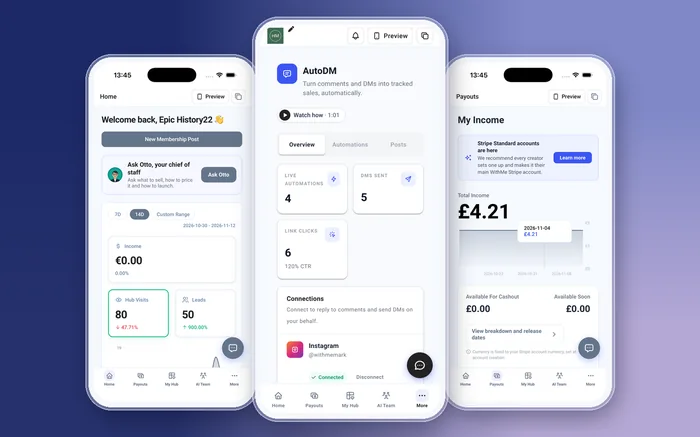
- Add a comment keyword that sends your link. Ask people to comment a word, and comment-to-DM sends them your link in a direct message.
- Send people to one landing page with a free call or a lead magnet. One page, one next step.
- Follow up within 24 hours. Reply to new leads, book the call, and email the people who took your lead magnet.
Let your AI team do it
On WithMe, AI agents can do most of these steps for you. You still decide who you help and what you sell, and you take the calls.
| Step | Who does it | What you do |
|---|---|---|
| Posts planned and published | Margo plans and writes your posts and publishes them to Instagram, LinkedIn and Threads. A published post costs 2 credits. | Tell her who you help and what you sell, then review the plan. |
| Graphics for your posts | Margo makes carousel and story slides with images you can swap for your own photos. | Swap in your photos and approve. |
| The landing page | Dez builds a landing page you can preview, edit and add to your Hub. | Check the words and put it live. |
| Link sent when someone comments | WithMe comment-to-DM. It is part of the Hub plan, not AI credits. | Choose the keyword and the link. |
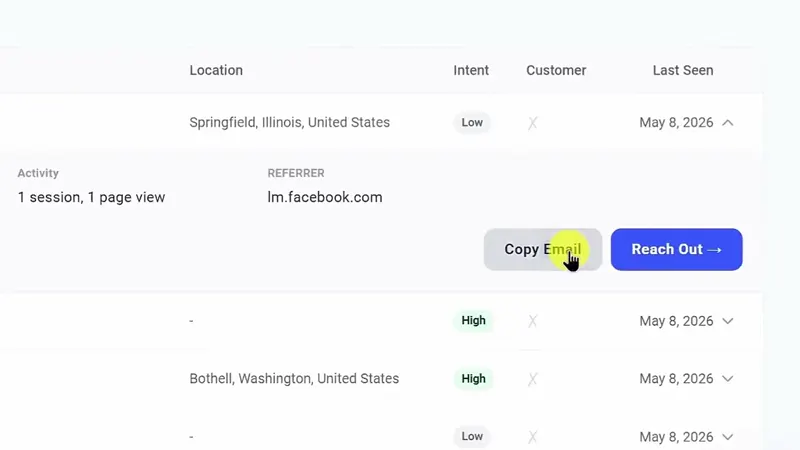
| Who visited your page | Sal shows who is browsing your pages and how warm each lead is. | Reach out to the warmest leads first. |
| Weekly plan and what to focus on | Otto checks your sales, products and customers and gives you a weekly plan. An action he proposes costs 1 credit when you approve it. | Approve or skip each action. |
| Calls and the sale | You. | Take the calls and close the sale. |
What it costs and what is not included
The Hub plan is $29 a month, or $25 a month billed annually (UK £25), with a 14-day free trial and 0% commission. Stripe fees apply. Comment-to-DM, email and checkout are part of the plan.
AI credits are separate from the Hub plan. Every creator gets 5 free credits a day, up to 30 a month, and during a Hub trial you get 60 credits up front instead. When you want more, you buy credits in monthly or yearly packs. A post Margo publishes costs 2 credits, and an action Otto proposes costs 1 credit when you approve it. Other jobs show their cost in the receipt after each one.
What the agents do not do
- Margo does not post to Facebook or TikTok.
- Margo does not publish reels or stories for you. She reminds you to post those yourself.
- Margo does not run or buy ads.
- Sales calls are yours. No agent takes a call or closes a sale for you.
Alternatives: build the same stack from separate tools
The usual do-it-yourself stack is ManyChat for comment-to-DM, Canva for graphics, Buffer or Later for scheduling, and ChatGPT for writing. Prices below were checked on each vendor's own site on 23 Nov 2026.
| Tool | What it does here | Price (checked 23 Nov 2026) |
|---|---|---|
| ManyChat | Comment-to-DM | Not stated by vendor |
| Canva Pro | Graphics | $18 a month for one person, billed monthly. Yearly price not stated by vendor |
| Buffer Essentials | Scheduling | $5 a month per channel, or $60 a year for one channel. Free plan for up to 3 channels |
| Later Starter | Scheduling, instead of Buffer | $18.75 a month, billed yearly. Monthly price not stated by vendor |
| ChatGPT Plus | Writing | $20 a month |
Sources, checked 23 Nov 2026:
- ManyChat pricing (manychat.com/pricing)
- Canva pricing (canva.com/pricing)
- Buffer pricing (buffer.com/pricing)
- Later pricing (later.com/pricing)
- ChatGPT Plus (help.openai.com)
- WithMe pricing (withme.so/pricing)
When the separate stack is the better choice
- You already have a website, checkout and email tool you are happy with, and only need the Instagram side.
- You post to Facebook or TikTok, which Margo does not publish to.
- You want one tool per job and are happy to connect them yourself.
Questions people ask
What should I post to get coaching clients on Instagram?
Post answers to the questions your ideal client asks before they buy: the problem they have, what they have already tried, and what working with you looks like. End each post with one next step, such as a keyword to comment for your free guide or call link.
How often should I post?
Pick a pace you can keep for months. Three posts a week is a steady start by hand. If Margo publishes for you, each published post costs 2 credits.
Do I need ads to get coaching clients from Instagram?
No. Posts aimed at one client type, a comment keyword that sends your link and a quick follow-up can bring clients without ads. Ads can add reach once you know which posts and offers work, but they are a separate cost.
How does comment-to-DM work?
You choose a keyword and a link. When someone comments that keyword on your post, comment-to-DM sends them a direct message with the link, for example to your free call or lead magnet. On WithMe it is part of the Hub plan, with no charge per message and no AI credits.
What does it cost to use AI agents for this?
AI credits are separate from the Hub plan, which is $29 a month or $25 a month billed annually (UK £25). You get 5 free credits a day, up to 30 a month, or 60 up front during a Hub trial, and you can buy monthly or yearly packs. A post Margo publishes costs 2 credits, and an action Otto proposes costs 1 credit when you approve it.
Related guides
- How to send a link when someone comments on Instagram
- How to grow an email list from Instagram
- Landing page for a coaching offer
- AI marketing assistant for creators
- WithMe pricing
Get coaching clients from Instagram with your AI team
Try the Hub free for 14 days, with 60 AI credits during the trial.
Start your 14-day free trial