The best creator platform apps for iOS and Android are the ones that let you run the business, not just watch it. Most platforms have an app, but many are built for your customers, and the creator side is a dashboard of sales and notifications. This guide looks only at what a creator can do in each platform's own app: create products, edit pages, see sales, message members and post to a community.
We compared WithMe, Stan (Stan Store), Kajabi, Skool, Teachable and Podia. Each competitor entry comes from that company's own help centre, product pages or app store listing, checked 16 November 2026. Apps change often, so check the listing before you decide.
Which creator platforms have a real creator app?
In short: WithMe runs nearly the whole business in one app on iPhone and Android. Stan has a broad creator app on iPhone. Kajabi has a Kajabi Creator app on both stores for stats, contacts and adding lesson videos. Skool's one app covers community, courses, calendar and messages on both stores. Teachable's app is for students only, and Podia does not offer an app.
WithMe: the whole creator business in one app
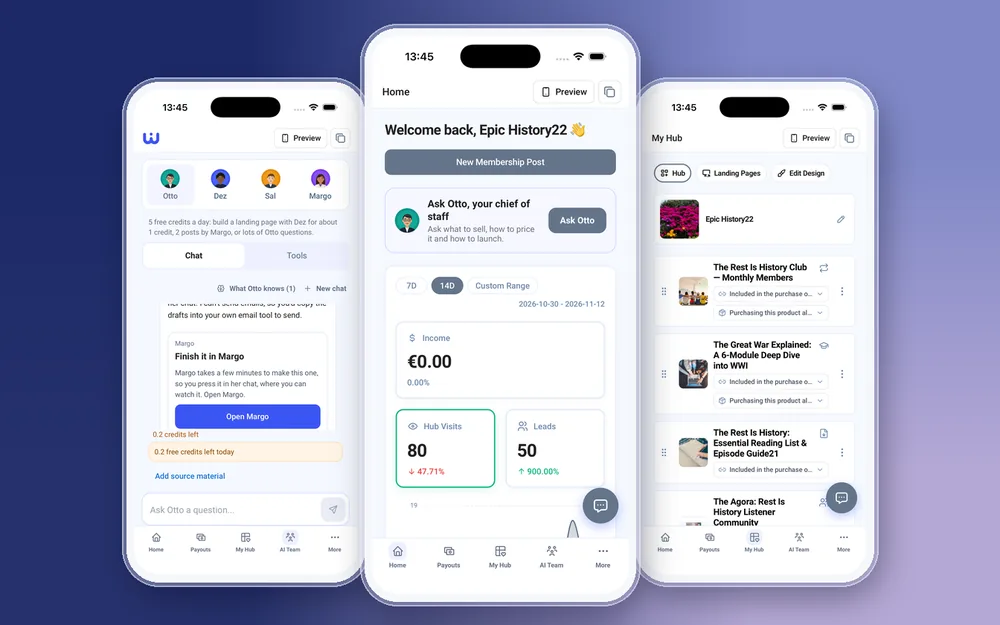
WithMe: The Creator App is on the App Store and Google Play. The same app serves creators and their customers, and a creator account opens the creator side automatically, with Home, Payouts, My Hub, AI Team and More tabs.
- Create, edit and delete every product type: courses with chapters, lessons and drip schedules, memberships with tiers and posts, digital products, 1:1 coaching, coaching calls, webinars, communities, custom products and lead captures. Set pricing and checkout questions.
- Upload video, audio, PDFs and images from your phone. Large files upload in chunks.
- Reorder your hub, change themes, colours and fonts, update branding and logos, and create or publish landing pages. Preview shows the hub as a visitor or customer sees it.
- Post in your community, moderate comments, answer paid DMs, run your 1:1 coaching workspace and manage your coaching calendar and availability.
- Send email broadcasts and sequences, and build Instagram Auto DM automations.
- See income, hub visits, leads and Insights reports, cash out from Payouts, manage customers and promo codes, chat with your AI Team, and get push notifications for sales and new leads.
Done on the web instead: creating the account and starting the trial, billing, plan changes and buying AI credits, the live broadcast itself (you can schedule a live post and watch in the app), Dez's full AI page builder and Margo, and integrations such as API keys, webhooks, tracking pixels and connecting Zoom or Google Meet.
Stan (Stan Store): a strong iPhone app
Stan's creator app, Stan: Link in Bio for Creators, is one of the more capable creator apps, and its App Store listing describes building the business without a laptop.
- Upload digital downloads, courses, coaching calls, webinars and subscription products from your phone, with drag-and-drop ordering.
- Design your storefront with colours, fonts, images or ready-made themes.
- See clicks, views, revenue and top traffic sources, get a push notification for each sale and cash out to your bank.
- Platforms: the app is on the App Store, and we found no Stan creator app on Google Play. The separate Stan Community app is iOS only, and Stan's help centre says it is primarily for members and will not include admin actions just yet.
Kajabi: a creator app for stats and contacts
Kajabi Creator is on the App Store and Google Play. Kajabi's help centre describes it as a way to manage your site from anywhere.
- Track offers sold, net revenue, new customers, opt-ins and page views, and review recent transactions.
- Get notifications for purchases, payments, refunds, opt-ins and enrolments.
- Create, edit and tag contacts, and grant or revoke offers. Record or upload a video and add it to a lesson.
- Kajabi's feature list for the app does not include building offers, pages or emails, so plan those for the web. Its separate Cofounder app lets you continue AI conversations on your phone, but Kajabi says to build or edit an automation in a web browser.
Skool: the best app for a community-first business
Skool's app is on the App Store and Google Play, and its listing promises all of Skool's features plus push notifications. If your business is mainly a community, this is the strongest app in the group.
- Post, comment and run discussions in your community from your phone.
- Courses with video and text lessons, a calendar for community events, and direct messages.
- Community settings are reachable in the app: Skool's help centre explains how to scroll the settings menu in the app to find the Billing tab. If you plan to build courses on your phone, check Skool's help centre first, as we found no article on it.
Teachable: a student app, not a creator app
Teachable's app is free on iOS and Android, but its help centre is clear about who it is for.
- Teachable says the app is designed for student use only, and admins cannot manage schools or courses via the app. Course building, sales and student management happen in the browser.
- In the student app itself, coaching products, digital downloads, memberships and community are not supported.
Podia: no app
Podia's help centre answers the question directly: we do not currently offer a mobile app. Creators work in Podia from a web browser, and members reach their courses and products in the browser too.
How do you choose a creator platform app?
- You want to run the whole business from your phone on iPhone or Android, including products, emails, Auto DMs, coaching and payouts: choose WithMe.
- You sell a few products from a link in bio and use an iPhone: Stan's app covers products, storefront design, sales and cash out.
- You already run your business on Kajabi at a desk and want sales alerts and contact edits on the go: the Kajabi Creator app does that.
- Your business is a community above all: Skool's app is built for posting, messaging and events on both platforms.
- You are happy to build and sell from a laptop and only need students on mobile: Teachable's student app or Podia in the browser will do.
How do you get started with WithMe on your phone?
You need a WithMe account before the app's creator side will open, so start on the web. WithMe is $25 per month billed annually (UK £25), with a 14-day trial and 0% WithMe commission on sales. Stripe and PayPal fees still apply. More than 8,000 creators use it.
- Go to the WithMe sales page at withme.so/become-a-creator and start your 14-day trial.
- Download WithMe: The Creator App from the App Store or Google Play.
- Sign in with the same account and the creator tabs open automatically.

Creator platform app questions
What is the best creator platform app for iOS and Android?
For running the whole business from a phone, WithMe, which works on both iPhone and Android. For a community-first business, Skool's app is strong on both. Stan's creator app is broad but we found it on iPhone only, checked 16 November 2026.
Can I build a Kajabi course in the Kajabi Creator app?
You can record or upload a video and add it to a lesson. Kajabi's feature list for the app covers stats, transactions, contacts and offers access, not building offers, pages or emails, so plan those for the web.
Does Teachable have an app for creators?
No. Teachable's help centre says its iOS and Android app is designed for student use only and admins cannot manage schools or courses in it.
Is there a Stan Store app for Android?
Stan's creator app is on the App Store, and we found no Stan creator app on Google Play when we checked on 16 November 2026.
Do my customers get an app with WithMe?
Yes. Customers get the WithMe app on iOS and Android included with every hub. A fully branded app in your own name is a paid extra.
Start your 14-day trial at https://www.withme.so/become-a-creator.