A creator app for iOS and Android lets you run your online business from your phone: build courses and memberships, answer customers, send emails, watch sales and cash out, without waiting until you are back at a laptop. WithMe: The Creator App does all of that on iPhone and Android, from the App Store and Google Play.
This guide walks through what the app does tab by tab, what you can build in it, what still happens on the web, and how to get started. Each section links to a deeper guide if you want the detail for one part of your business.
What is the WithMe creator app?
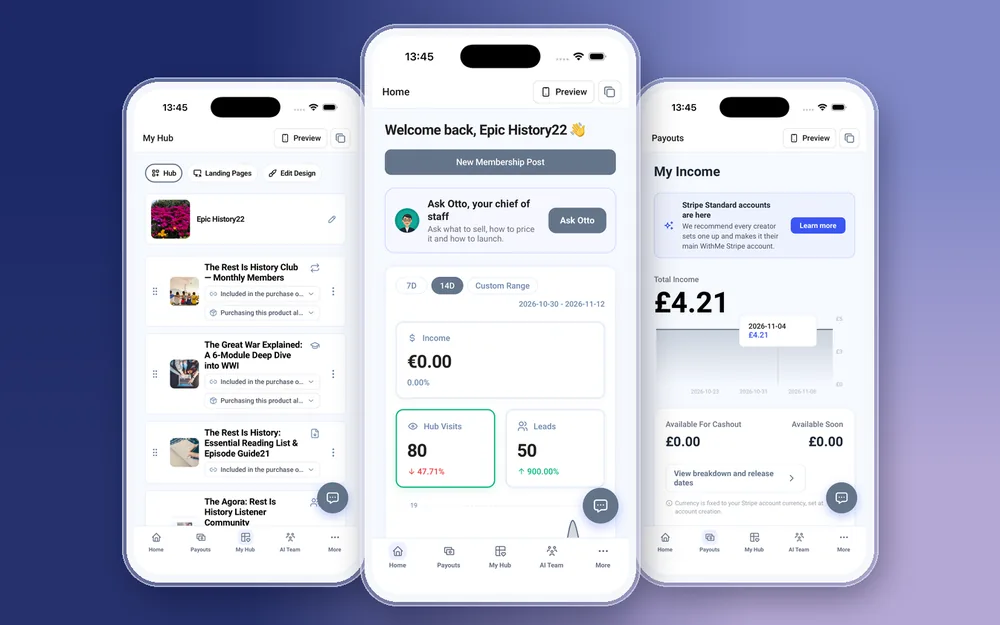
It is the same WithMe app your customers use to watch lessons and post in your community. When you sign in with a creator account, the app opens the creator side automatically, so there is no mode to switch and no second app to install. A Preview button shows your hub as a visitor or a customer sees it, so you can check a change before anyone else does. Your customers get the WithMe app on iOS and Android included with every hub, and a fully branded app in your own name is available as a paid extra.
What is on each tab of the creator app?
The creator side has five tabs along the bottom of the screen.
- Home: income, hub visits and leads over the last 7 days, 14 days or a custom range, plus a launch checklist that shows what is left before your hub is ready to sell.
- Payouts: your income, a chart over time, the amount available for cashout and a button to cash out.
- My Hub: every product and section on your hub, which you can reorder, edit or add to, plus Edit Design for themes, colours and fonts.
- AI Team: chat with Otto, Sal and Dez about what to sell, who to follow up with and how your page looks.
- More: everything else, from customers and email to promo codes and settings.
What is in the More menu?
The More tab holds Success videos, Insights, Customers, Calendar, Email Marketing, Auto DMs, Promo Codes, Refer, Branding, Custom domain, Settings, and Language and Currency. Insights has five reports: Overview, Sales, Audience, Content and Marketing. Settings is also where you add team or admin accounts, so a virtual assistant can work in your hub from their own phone, and where Help lets you search answers, ask Otto or chat with support.
Can you create products on iPhone and Android?
Yes. Every product type can be created, edited and deleted in the app on both platforms, with pricing and checkout questions set on the same screens.
- Courses with chapters and lessons, a drip schedule so lessons open over time, and drag to reorder.
- Memberships with tiers, posts that mix text, video, audio, images and PDFs, scheduled posts and collections.
- Digital products such as guides, templates and audio files.
- 1:1 coaching, coaching calls and webinars, with your availability and a calendar in day, week or month view.
- Communities, custom products, lead captures, and external or affiliate links.
Video, audio, PDFs and images upload straight from your phone's library, and large files upload in chunks, so a long lesson recorded on your phone does not need to go through a computer first. You can also create landing pages, publish or unpublish them, and move one onto your hub when it is ready.
How do you design your hub from the app?
My Hub is where your storefront takes shape. Drag products and sections into the order you want, open Edit Design to change the theme, colours and fonts, and update your hub profile and branding, including your logos, from Branding in the More menu.
Custom domain setup is in the app too, so you can point your own domain at your hub without opening a laptop. Use Preview after each change to see exactly what a visitor will see.
How do you look after customers from your phone?
Most of a creator's day is people, and the app keeps those conversations in one place.
- Customers: see who bought what, review applications and requests, manage affiliates, add a customer by hand or import a CSV.
- Community: write posts, organise categories and moderate comments.
- Paid DMs: message customers per product, with attachments.
- 1:1 coaching workspace: each client's feed, goals and applications, with calls you join in Zoom or Google Meet straight from the calendar.
Can you do marketing from the creator app?
Email marketing is fully in the app: write broadcasts, build sequences, set up automated emails, pick recipients and manage your sending domain. Promo codes and your referral link sit in the More menu.
Auto DMs bring Instagram comment-to-DM to your phone. Create an automation, choose the keyword, and when someone comments it on your post they get a DM with your link. Instagram connects through a browser sign-in the first time, then you create and edit automations in the app.
How do you see sales and get paid from the app?
The Payouts tab shows what you have earned, a chart of income over time and how much is available for cashout. Cash out from the same screen. Stripe onboarding opens Stripe's own site, so your bank details are entered with Stripe rather than in the app. WithMe takes 0% commission on your sales, and Stripe or PayPal fees still apply.
Push notifications tell you about your first sale, new payments, new leads, claims of a free product and leads from your visitor agent. Tapping a notification opens the right screen, so a new lead goes straight to that lead rather than to the Home tab.
What does the AI Team do on your phone?
Otto is your chief of staff: ask what to sell next, how to price it or how to plan a launch. Sal looks after your warm leads, hot leads and visitors, so you know who is worth a follow-up today. Dez can be chatted with in the app, with a preview of your page. Dez's full page builder and Margo open on the web.
What still happens on the web?
A few things stay in the browser. You create your account and start your trial on the web, and billing, plan changes and buying AI credits are web only. Going live is broadcast from the web, though you can schedule a live post and watch in the app. Integrations such as API keys, webhooks, tracking pixels, and connecting Zoom or Google Meet are set up on the web once, then work everywhere.
How do you get started with the creator app?
You need a WithMe account before the app can open the creator side, so start on the web.
- Go to the WithMe sales page at withme.so/become-a-creator and start your 14-day trial.
- Download WithMe: The Creator App from the App Store on iPhone or Google Play on Android.
- Sign in with the same account. The creator tabs open automatically.
WithMe is $25 per month billed annually (UK £25), with a 14-day trial and 0% WithMe commission on sales. More than 8,000 creators use WithMe, and the app comes with every hub at no extra cost.
Creator app questions
Is there a WithMe creator app for iPhone and Android?
Yes. WithMe: The Creator App is on the App Store for iPhone and on Google Play for Android. Sign in with a creator account and the creator side opens automatically.
Can I sign up for WithMe in the app?
No. Create your account and start the 14-day trial on the WithMe sales page at withme.so/become-a-creator first, then download the app and sign in with the same account.
Can I build a whole course on my phone?
Yes. Create chapters and lessons, upload video, audio, PDFs and images from your phone, set a drip schedule, reorder lessons and set the price, all in the app.
Do my customers need a different app?
No. Customers use the same WithMe app on iOS and Android, included with every hub. It shows them the customer side, and you see the creator side.
What can I not do in the creator app?
Account sign-up, billing and plan changes, buying AI credits, going live, Dez's full page builder, Margo and integrations such as API keys, webhooks, pixels and Zoom or Google Meet connections are done on the web.
Start your 14-day trial at https://www.withme.so/become-a-creator.
Related guides
- Start your 14-day trial
- How to create an online course on iPhone or Android
- Sell digital products from your phone
- Coaching app for iOS and Android
- Membership site app for iOS and Android
- Email marketing app for creators
- Instagram auto DM app for iPhone and Android
- Track creator sales and payouts in the app
- Best creator platform apps for iOS and Android
- The 15-minute creator routine on your phone