A creator sales and payouts app should answer three questions quickly: what did I sell, where did it come from, and what can I cash out. In WithMe: The Creator App on iPhone and Android, the Home tab shows income, hub visits and leads, the Payouts tab shows what is available and lets you cash out, and Insights breaks your numbers down by sales, audience, content and marketing.
Because the app is the same account as your hub, there is nothing to sync. A sale on your storefront shows up in the app, and a push notification tells you when it happens. This guide walks through each screen, what you can act on from your phone, and how to get started.
What does the Home screen show?
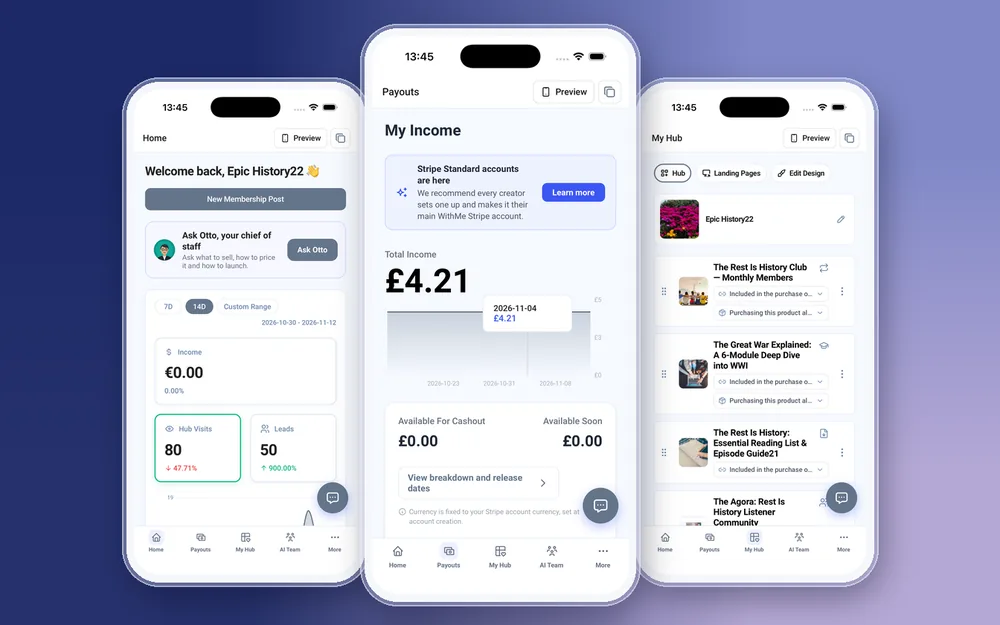
Home is the first tab. It shows your income, hub visits and leads, and you can switch between the last 7 days, the last 14 days or a custom date range. That is enough to see whether a launch, a post or an email moved anything this week.
New hubs also see a launch checklist on Home, a short list of what is left to do before you launch. It is worth clearing early, because a hub with no payouts set up cannot pay you.
How do payouts work in the app?
The Payouts tab is the second tab along the bottom. It shows your income, a chart over time and the amount available for cashout. When there is money available, you can cash out from the same screen on your iPhone or Android phone.
Payments run through Stripe, so you set up a Stripe account to get paid. In the app, Stripe onboarding opens Stripe's own site, where you add your details and bank account. When you finish, you come back to the app and Payouts picks up from there.
WithMe takes 0% commission on your sales. Stripe and PayPal processing fees still apply, as they would on any platform that uses them.
Which Insights reports can you see on your phone?
Open More, then Insights. There are five reports:
- Overview: your main numbers on one screen.
- Sales: what you sold and what it brought in.
- Audience: the people visiting and buying from your hub.
- Content: how your products and content are doing.
- Marketing: how people are finding your hub.
Home tells you whether this week was good or bad. Insights helps you see why. If visits are up and sales are flat, start with the Content and Sales reports. If visits are down, start with Marketing and Audience. Read them before you decide what to make or promote next, not after.
Which notifications does the app send?
Push notifications cover the moments you would otherwise refresh a dashboard for:
- Your first sale.
- Payments as they come in.
- New leads.
- Free unlocks of your free products.
- Leads from your visitor agent.
Tapping a notification opens the right screen in the app, so a new lead takes you to that lead rather than to the start of the app.
Can you see who bought?
Yes. The Customers screen in More lists your customers, along with applications, requests and affiliates. You can add a customer by hand or import a CSV, which helps when you move from another platform.
In the AI Team tab, Sal shows your warm leads, hot leads and recent visitors. Otto, your AI chief of staff, can talk through what to sell next, how to price it and how to plan a launch, using what is happening on your hub.
How do you turn the numbers into the next sale?
Numbers are only useful if you do something with them. From the same app you can:
- Create a promo code under Promo Codes when sales are slow, and send it to your list in an email broadcast.
- Edit the product that is getting visits but not sales: the price, the description or the checkout questions.
- Follow up warm leads from Sal with an email, or move them into a sequence.
- Share your referral link under Refer to earn from other creators you bring to WithMe.
What do you still do on the web?
You create your WithMe account and start the trial on the web. Billing, plan changes and buying AI credits happen there too, as do integrations such as tracking pixels, API keys and webhooks. Checking sales, reading Insights and cashing out all work in the app.
How to get started
You need a WithMe account before the app can open the creator side, so start on the web:
- Go to the WithMe sales page at withme.so/become-a-creator and start the 14-day trial.
- Download WithMe: The Creator App from the App Store or Google Play.
- Sign in with the same account. The creator tabs open on their own: Home, Payouts, My Hub, AI Team and More. Set up Stripe from Payouts.
What does WithMe cost?
WithMe is $25 per month billed annually (UK £25), with a 14-day trial and 0% WithMe commission on sales. Stripe and PayPal fees still apply. More than 8,000 creators use WithMe, and your customers get the WithMe app on iOS and Android with every hub.
Creator sales and payouts app questions
Can I check my creator sales on my iPhone?
Yes. WithMe: The Creator App on the App Store shows income, hub visits and leads on Home, payouts on the Payouts tab and five Insights reports in More. The Android app on Google Play shows the same.
Can I cash out from the app?
Yes. The Payouts tab shows the amount available for cashout and has a cash out option. You need to finish Stripe onboarding first, which opens Stripe's own site from the app.
Does WithMe take a cut of my sales?
No. WithMe takes 0% commission on sales. Stripe and PayPal processing fees still apply. The plan is $25 per month billed annually (UK £25).
Can I sign up for WithMe in the app?
No. Start the 14-day trial on the WithMe sales page at withme.so/become-a-creator first, then download the app and sign in with the same account.
Will the app tell me when I make a sale?
Yes. The app sends push notifications for your first sale, payments, new leads, free unlocks and visitor agent leads, and tapping one opens the matching screen.
Start your 14-day trial at https://www.withme.so/become-a-creator.