You can sell digital products from your phone without touching a laptop: upload the file, set a price, share the link, then watch the sales and cash out. WithMe: The Creator App on iOS and Android does each step natively, so a guide you finish on the train can be on sale before you get off.
This guide covers what to sell, how to set it up in the app, how to price and promote it, and how sales and payouts work. It ends with how to get started, because the account is created on the web first.
What digital products can you sell from a phone?
Anything that is a file. The app uploads PDFs, images, audio and video from your phone, with large files uploaded in chunks. Popular formats include:
- PDF guides, ebooks, workbooks and checklists.
- Templates and planners, exported as PDFs or images.
- Audio: meditations, workouts, lessons or a short series.
- Video: a single masterclass or tutorial that does not need a full course structure.
- A free download used as a lead capture, so people swap their email for the file and join your list.
How do you create a digital product in the WithMe app?
Have the file saved on your phone first, in Files on iPhone or in your downloads on Android.
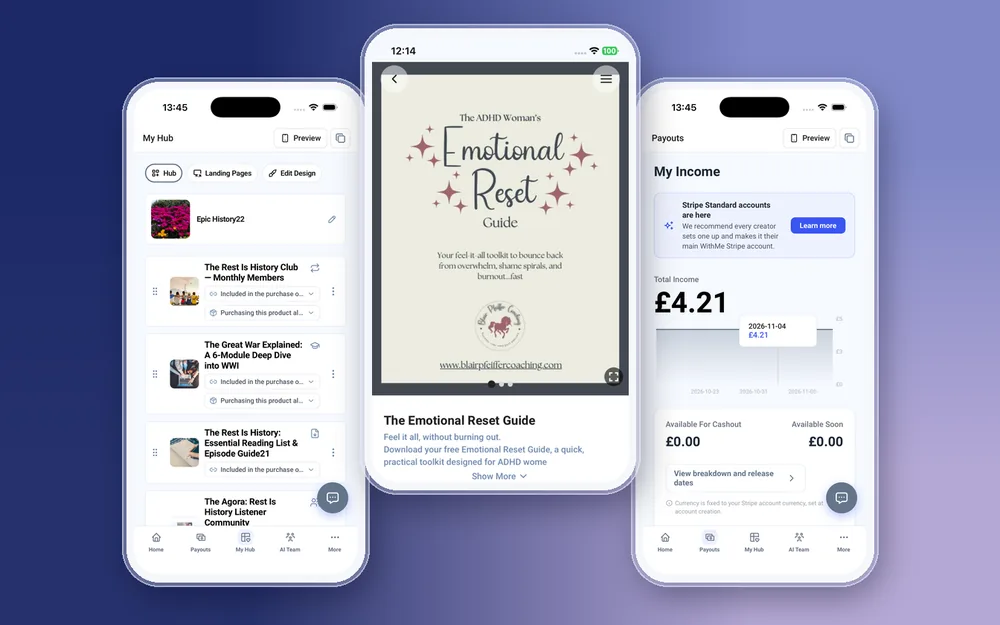
- Sign in to the creator app and create a new digital product.
- Give it a clear title and a short description that says what the buyer gets and who it is for.
- Upload the file or files, plus any images you want to show on the product page.
- Set the price, and add checkout questions if you want to ask buyers something when they pay.
- Tap Preview to see your hub as a visitor or a customer sees it.
- Publish. The product appears on your hub, and you can reorder it in My Hub so your best seller sits at the top.
How should you price a digital product?
Price by the result, not the page count. A checklist that saves someone an afternoon can sell for a few pounds or dollars; a full workbook with a clear outcome can sell for much more. Start with one product at one price, then test a promo code before changing the list price.
WithMe takes 0% commission on the sale. Stripe and PayPal processing fees still apply, so the rest is yours to cash out.
How do you promote a digital product from your phone?
The marketing tools sit in the More menu of the same app:
- Auto DMs: when someone comments a keyword on your Instagram post, they get the product link in their DMs.
- Email Marketing: send a broadcast to your list, or set up a sequence that sends the link after someone joins.
- Promo Codes: create a code for launch week or for your email subscribers.
- Landing pages: create a page for the product, publish it, and share that link in your bio.
How do you track sales and get paid?
The Home tab shows income, hub visits and leads over 7 days, 14 days or a custom range, and a push notification arrives for your first sale and for payments, opening the right screen when you tap it. Insights has Sales, Audience, Content and Marketing reports, and Customers lists every buyer.
The Payouts tab shows your income, a chart, and what is available for cashout, with a button to cash out. If you have not connected Stripe yet, the app opens Stripe's own site for that one step.
How do you update a digital product after it starts selling?
Open the product in the app, upload the new version of the file, and edit the title, description or price if they need to change. Let buyers know with an email broadcast from the same app. If a product has run its course, you can delete it, or move it lower on your hub in My Hub.
Check the Customers list and the Sales report in Insights before you change a price, so you know how many people bought at the old one and when sales usually come in.
What do you still do on the web?
Creating your account, starting the trial, billing and plan changes are done on the web. Tracking pixels, webhooks and API keys are set up there too. Creating, pricing, promoting and selling the product all work in the app.
How to get started
- Go to the WithMe sales page at withme.so/become-a-creator and start your 14-day trial on the web.
- Download WithMe: The Creator App from the App Store on iPhone or Google Play on Android.
- Sign in with the same account. The creator tabs open automatically: Home, Payouts, My Hub, AI Team and More.

WithMe is $25 per month billed annually (UK £25), with a 14-day trial and 0% WithMe commission. More than 8,000 creators use it. Buyers can open what they bought on the web or in the WithMe app on iOS and Android, included with every hub.
Selling digital products from your phone: questions
Can I sell digital products from my iPhone?
Yes. Once your account is set up on the web, you can upload files, set a price, publish and promote digital products from WithMe: The Creator App on iPhone.
Is the Android app the same?
Yes. The creator app on Google Play has the same digital product, marketing and payout tools as the iOS version.
What file types can I upload from my phone?
PDFs, images, audio and video. Large files upload in chunks, so long audio or video works from the app.
Does WithMe take a cut of each sale?
No. WithMe takes 0% commission. You pay $25 per month billed annually (UK £25), and Stripe or PayPal processing fees apply to each payment.
Can I give away a free download to grow my email list?
Yes. Create a lead capture product so people enter their email to get the file, and you get a push notification for new leads.
Start your 14-day trial at https://www.withme.so/become-a-creator.