If you have searched Google Play for a Stan Store app for Android, you have probably come up empty. Stan's creator app is listed on the App Store as an iPhone app, and when we checked on 16 November 2026 we found no Stan creator app on Google Play.
This guide covers what Stan's iPhone app does, what Android creators can do instead, and how WithMe: The Creator App works on both iPhone and Android, so you can build products, edit your hub and get paid from any phone.
Is there a Stan Store app for Android?
Stan's creator app is called Stan: Link in Bio for Creators on the App Store, sold by FindCommunity, Inc., and the listing is marked Only for iPhone. We searched Google Play for Stan Store, Stan link in bio, FindCommunity and stanwith, and checked the likely developer and package pages. We found no Stan creator app there.
That does not mean Stan will never release one. It means that, as of 16 November 2026, an Android phone cannot install Stan's creator app from Google Play.
What does Stan's iPhone app do?
According to its App Store listing, the iPhone app covers the core of a Stan store:
- Add digital downloads, courses, coaching calls, webinars and subscription products.
- Reorder products with drag and drop.
- Change storefront colours, fonts, images and themes.
- See analytics on clicks, views, revenue and traffic sources.
- Get a push notification for each sale and cash out to your bank.
Stan also has a separate Stan Community app. Stan's help centre says it is currently only available on iOS, is mainly for community members and does not include admin actions yet.
What can Android creators use instead?
If you sell with Stan and use an Android phone, you have a few choices:
- Keep using Stan through its website, from a computer or your phone's browser.
- Borrow an iPhone for the tasks you want to do on the go.
- Wait and check Google Play again in case Stan releases an Android app.
- Move to a platform whose creator app is on both the App Store and Google Play.
If most of your selling happens from your phone, the last option is usually the one that sticks. That is where WithMe comes in.
What can you do in the WithMe app on Android?
WithMe: The Creator App is on the App Store and Google Play. On Android you get the same creator tools as on iPhone:
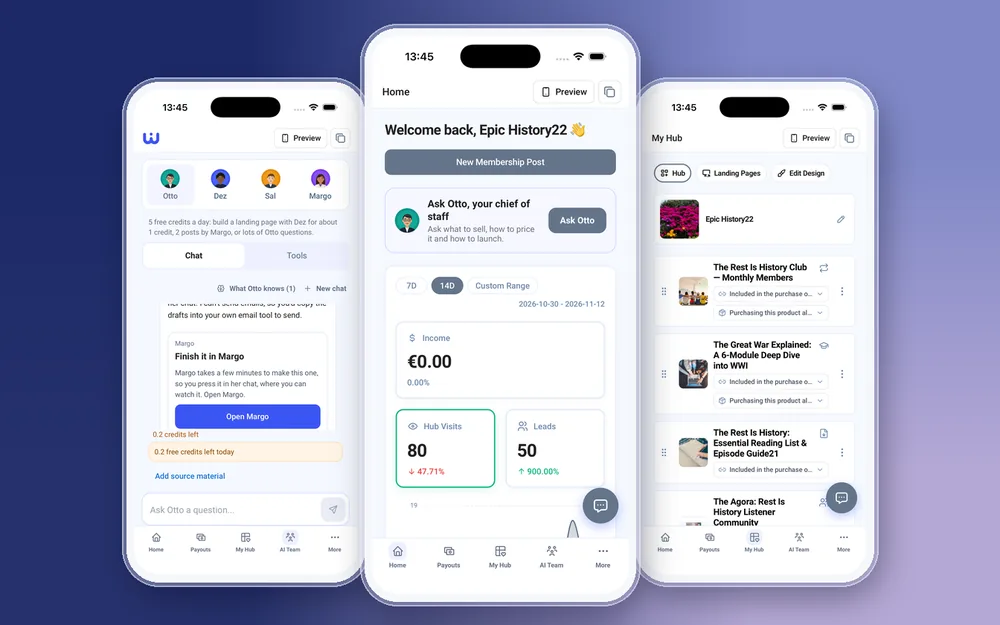
- Create, edit and delete every product type: courses, memberships, digital products, 1:1 coaching, coaching calls, webinars, communities, lead captures and links.
- Upload video, audio, PDFs and images straight from your phone.
- Reorder your hub, and change themes, colours and fonts in Edit Design.
- Build landing pages, send email broadcasts and set up Instagram Auto DMs.
- Check income, hub visits and leads on Home, and cash out from Payouts.
- Ask Otto, your AI chief of staff, what to sell next and how to price it.
Is the WithMe app the same on iPhone and Android?
Yes. It is one app on both stores, and the same app your customers use. Sign in with a creator account and the creator side opens on its own, with five tabs along the bottom: Home, Payouts, My Hub, AI Team and More. Push notifications for sales, payments and new leads work on both, and tapping one opens the right screen.
How do you move from Stan to WithMe?
Start the trial on the web, then recreate your products in My Hub from your phone. Upload your files, set your prices and checkout questions, and tap Preview to see your hub as a visitor sees it. When it looks right, swap the link in your Instagram or TikTok bio. Our Stan migration guide walks through each step.
What still needs the web?
A few things happen on the web: creating your account and starting the trial, billing and plan changes, buying AI credits, and integrations such as webhooks and tracking pixels. Day-to-day selling works in the app.
How to get started on Android or iPhone
You need a WithMe account before the app's creator side can open, so start on the web:
- Go to the WithMe sales page at withme.so/become-a-creator and start your 14-day trial.
- Download WithMe: The Creator App from Google Play on Android or the App Store on iPhone.
- Sign in with the same account. The creator tabs open, and you can add your first product from My Hub.

What does WithMe cost?
The app is included with WithMe, which is $25 per month billed annually (UK £25), with a 14-day trial and 0% WithMe commission on sales. Stripe and PayPal fees still apply. More than 8,000 creators use WithMe, and your customers get the WithMe app on iOS and Android with every hub.
Stan Store Android app questions
Does Stan Store have an Android app?
We found no Stan creator app on Google Play when we checked on 16 November 2026. Stan's creator app on the App Store is marked Only for iPhone.
Can I run my Stan store from an Android phone?
You can use Stan through its website in your phone's browser. There is no Stan creator app to install from Google Play that we could find.
Is WithMe's creator app on Android?
Yes. WithMe: The Creator App is on Google Play and the App Store, with the same creator features on both.
Can I sell digital products and courses from the WithMe app?
Yes. You can create digital products, courses, memberships, coaching and more in the app, upload the files from your phone and set the price.
Do I need a computer to start with WithMe?
Only to sign up. Start your trial on the WithMe sales page, then download the app and sign in. Billing and buying AI credits also happen on the web.
Start your 14-day trial at https://www.withme.so/become-a-creator.