An email marketing app for creators should let you write to your list from the same phone you film, post and reply on. In WithMe: The Creator App on iOS and Android, email marketing sits in the More menu next to Customers and Auto DMs. You can write a broadcast, edit a sequence, change an automated email and check who will receive it, without opening a laptop.
Your list is not a separate tool either. The people who buy, join a lead capture or claim something free on your hub are already your customers in WithMe, so the email side and the sales side work from the same records. This guide covers what you can do on an iPhone or Android phone, what still happens on the web, and how to get started.
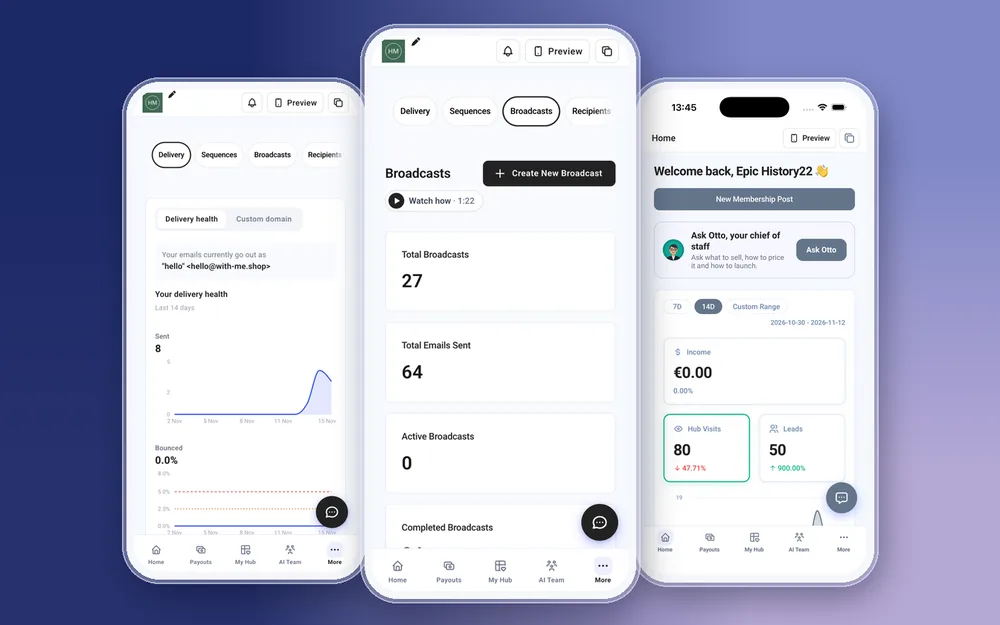
What can you do with email marketing in the WithMe app?
Open More, then Email Marketing. Everything below works the same on iPhone and Android.
- Broadcasts: write a one-off email and send it to your list or to a group of customers.
- Sequences: a run of emails that go out in order after someone joins, such as a welcome series.
- Automated emails: the messages that go out on their own, which you can read and edit from your phone.
- Recipients: check and choose who an email goes to before it sends.
- Sending domain: set up the domain your emails come from, so they arrive from your own name and address.
How do you send a broadcast email from your phone?
A broadcast is the email you send when you have news: a new course, a launch, a live session, a discount for the weekend. In the app you write the subject and the body, pick the recipients and send. It is the same broadcast you would send from a desktop, saved to the same account.
Short emails suit the phone. One idea, one link, one reason to click. If you are announcing a product you built in the app, you can create it, publish it and email your list about it in the same sitting. Promo Codes sits in the same More menu if you want to add a code to the email.
Can you edit email sequences on iPhone and Android?
Yes. A sequence is a set of emails that run in order after someone joins, so a new subscriber gets the first one straight away, the second a few days later, and so on. A welcome sequence is the common one: who you are, what you help with, your best free piece, then your offer.
Editing a sequence in the app helps most when something changes. A price goes up, a link moves, a launch ends. You open the sequence, update the email that mentions it and carry on, rather than leaving an old offer running until you are back at your desk.
What about automated emails?
Automated emails go out on their own when someone does something on your hub. They are easy to forget because nobody writes them each week. Read them on your phone every month or so. If one still mentions last year's price or links to a product you have retired, fix it in the app there and then.
Who receives your emails?
Your recipients are the people on your Customers list: buyers, members, people who joined something free and people who filled in a lead capture. Before you send, check who the email is going to. A launch email to everyone reads differently from a note to people who already bought.
If you are moving from another email tool, you can add customers one at a time in the app or bring a list across with a CSV import from the Customers screen. Only import people who agreed to hear from you.
Why set up a sending domain?
A sending domain means your emails come from an address on your own domain. Inboxes are more likely to trust mail from a domain that has been set up for sending, and readers recognise your name in their inbox. You start the setup in the app. The records themselves are added wherever your domain is managed, which is usually your domain registrar.
How do people get onto your email list?
Your list grows from the same hub you sell from. The usual routes are:
- A lead capture: a free guide, checklist or video in exchange for an email address, built in the app like any other product.
- Free products and free unlocks, which add the person to your customers.
- Instagram Auto DMs: someone comments a word on your post and gets a DM with the link to your lead capture.
- Sales: every buyer becomes a customer you can email about what comes next.
The app sends a push notification when a new lead comes in, and the Home screen counts leads over 7 days, 14 days or a date range you choose. That is usually the first sign that a post or an Auto DM is working.
What do you still do on the web?
Very little for email. You create your WithMe account and start the trial on the web, and billing and plan changes live there too. Connecting outside tools with API keys or webhooks is also a web job. Writing, sending and editing emails all work in the app.
A simple weekly email routine on your phone
Email works best when it is regular. Ten minutes a week on your phone is enough for most creators:
- Check Home for new leads and sales over the last 7 days.
- Write one broadcast with one link: a lesson, a story from a client, or an offer.
- Open your welcome sequence and make sure every link and price is still right.
- Look at the Audience and Marketing reports in Insights before you plan next week.
How to get started
You need a WithMe account before the app can open the creator side, so start on the web:
- Go to the WithMe sales page at withme.so/become-a-creator and start the 14-day trial.
- Download WithMe: The Creator App from the App Store or Google Play.
- Sign in with the same account. The creator tabs open on their own: Home, Payouts, My Hub, AI Team and More. Email Marketing is in More.
What does WithMe cost?
WithMe is $25 per month billed annually (UK £25), with a 14-day trial and 0% WithMe commission on sales. Stripe and PayPal fees still apply. Email marketing is part of the same plan as your courses, memberships, coaching and community, and more than 8,000 creators use WithMe.
Email marketing app questions
Is there an email marketing app for creators on iPhone?
Yes. WithMe: The Creator App on the App Store includes email marketing for creators: broadcasts, sequences, automated emails, recipients and a sending domain. The Android app on Google Play has the same features.
Do I still need Mailchimp or Kit?
Not for most creators. WithMe has email built in, and your list is made up of the same customers who buy from your hub. If you already use another tool, you can bring your list across with a CSV import.
Can I send emails from an Android phone?
Yes. Open More, then Email Marketing, in the WithMe app on Android. Broadcasts, sequences and automated emails work the same as on iPhone.
Can I create my WithMe account in the app?
No. Start the 14-day trial on the WithMe sales page at withme.so/become-a-creator first, then download the app and sign in with the same account.
Where do my email subscribers come from?
From your hub: lead captures, free products, sales and Instagram Auto DMs that send people to a sign-up page. You can also add customers yourself or import a CSV of people who agreed to hear from you.
Start your 14-day trial at https://www.withme.so/become-a-creator.
Related guides
- Start your 14-day trial
- Creator app for iOS and Android
- Instagram auto DM app for iPhone and Android
- The 15-minute creator routine on your phone
- Creator platform with email marketing built in
- How to write a welcome email sequence
- How to grow an email list from Instagram
- Mailchimp alternatives for creators
- Kit (ConvertKit) alternatives
- WithMe pricing