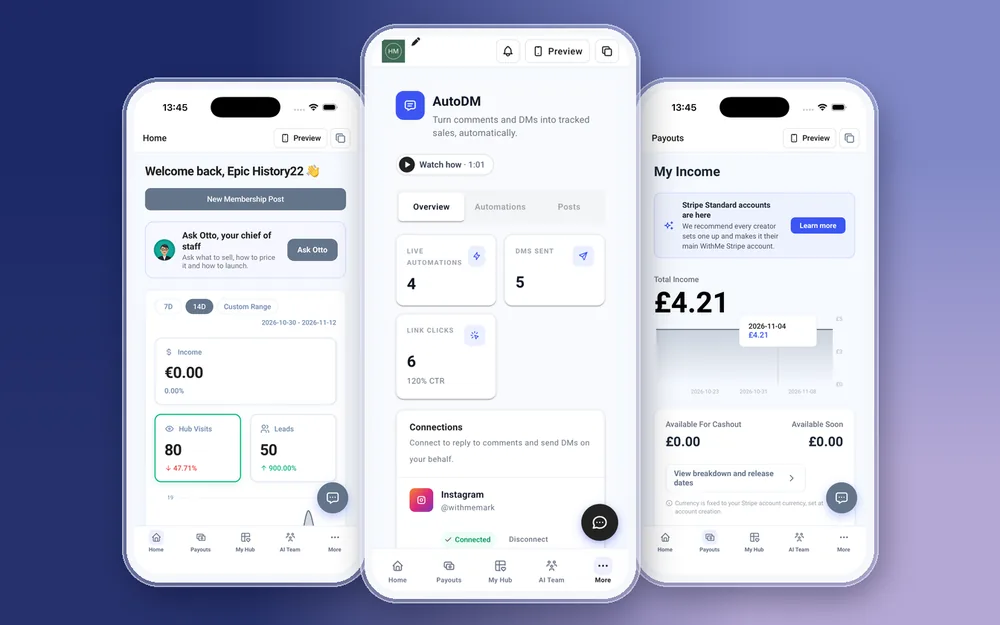
An Instagram auto DM app sends a direct message to anyone who comments a chosen word on your post, so the person who typed GUIDE under your reel gets the link without you replying by hand. WithMe: The Creator App on iPhone and Android has Auto DMs built in. You create and edit comment-to-DM automations from your phone, and the link in the DM goes to a product, lead capture or landing page on your own hub.
That last part is the difference from a standalone DM tool. The DM, the sign-up page, the checkout, the email list and the sales numbers all sit in one account, so you can follow a comment through to a lead or a sale. This guide covers how comment-to-DM works on the phone, the one-time Instagram connection, and how to get started.
How does comment-to-DM work?
You choose a word. Everyone who comments that word gets a DM from your Instagram account with the message and link you wrote. A typical flow looks like this:
- You post a reel about a topic your free guide covers and ask people to comment a word, such as GUIDE.
- Someone comments GUIDE under the post.
- They get a DM from you with a short message and the link to your lead capture.
- They enter their email to get the guide and join your customers.
- Your welcome sequence takes it from there, and the app sends you a push notification about the new lead.
What can you do with Auto DMs in the WithMe app?
Open More, then Auto DMs. On iPhone and Android you can:
- Create a new comment-to-DM automation.
- Edit the trigger word, the message or the link on an automation you already have.
- Send the link to anything on your hub: a lead capture, a digital product, a course, a membership, a coaching product or a landing page.
- Check your automations before a post goes out, so the word in your caption matches the word the automation listens for.
The products the DM points to are built in the same app, so you can make a lead capture, publish it and set up the automation that sends people to it in one sitting.
How do you connect Instagram?
Instagram connects through a browser sign-in. The first time, the app opens Instagram's own login in a browser, you approve the connection and you come back to the app. After that, you create and edit automations in the app itself.
Instagram's own rules for automated messages apply, as they do with any DM tool. If the connection stops working, for example after you change your Instagram password, connect again the same way.
Where should the DM link go?
Send people to the page that matches what they asked for. Your hub homepage is rarely the right answer. Good destinations are:
- A lead capture, when the post offers something free. This is how a comment becomes an email subscriber.
- A digital product or course, when the post is about the thing you sell. Add a code from Promo Codes if the offer is time-limited.
- A landing page, when you are running a launch and want one page that explains the offer.
- A coaching product, when the post invites people to apply or book a call.
How do you write an auto DM people click?
The DM arrives seconds after the comment, while the person is still thinking about your post. Keep it to the point:
- Thank them and say what the link is in one line: here is the free guide you asked for.
- Use one link. Two links split attention and neither gets clicked.
- Write like you talk. People can tell a template from a person, and you can edit the wording from your phone whenever it feels stiff.
- Make the trigger word short and easy to spell, and repeat it in the caption and on screen.
How do you know your Auto DMs are working?
The Home screen shows hub visits, leads and income for the last 7 days, 14 days or a custom range. When a post with an Auto DM goes out, visits and leads should move within a day or two. Push notifications tell you about new leads, free unlocks and sales as they happen.
For more detail, Insights has Overview, Sales, Audience, Content and Marketing reports. In the AI Team tab, Sal shows your warm leads, hot leads and recent visitors, which helps you decide who to follow up with by email.
How is this different from ManyChat?
ManyChat and similar tools are dedicated chat automation products with their own subscription. If DM automation is all you need, a dedicated tool may offer more options. If the DM is there to send people to something you sell, having Auto DMs in the same place as your products, checkout and email list means fewer tools to connect and one set of numbers to check.
What do you still do on the web?
You create your WithMe account and start the trial on the web, and billing and plan changes happen there. The Instagram connection itself opens in a browser. Creating, editing and checking your automations all happen in the app.
How to get started
You need a WithMe account before the app can open the creator side, so start on the web:
- Go to the WithMe sales page at withme.so/become-a-creator and start the 14-day trial.
- Download WithMe: The Creator App from the App Store or Google Play.
- Sign in with the same account. The creator tabs open on their own. Go to More, then Auto DMs, and connect Instagram.
What does WithMe cost?
WithMe is $25 per month billed annually (UK £25), with a 14-day trial and 0% WithMe commission on sales. Stripe and PayPal fees still apply. Auto DMs come with the same plan as your products, email marketing and customer app, and more than 8,000 creators use WithMe.
Instagram auto DM app questions
Is there an Instagram auto DM app for iPhone?
Yes. WithMe: The Creator App on the App Store includes Instagram Auto DMs. You create and edit comment-to-DM automations from your iPhone, and the Android app on Google Play works the same way.
Can I set up comment-to-DM on Android?
Yes. Open More, then Auto DMs, in the WithMe app on Android. Connect Instagram through the browser sign-in once, then create your first automation.
Why does Instagram open in a browser?
Instagram's connection uses its own sign-in page, so you approve access on Instagram rather than typing your password into another app. It is a one-time step, and you come straight back to the WithMe app afterwards.
Can I sign up for WithMe in the app?
No. Start the 14-day trial on the WithMe sales page at withme.so/become-a-creator first, then download the app and sign in with the same account.
What should my auto DM link to?
The page that matches the post: a lead capture for a free guide, a product page for a paid offer, a landing page for a launch or a coaching product for calls. Avoid sending people to your homepage.
Start your 14-day trial at https://www.withme.so/become-a-creator.
Related guides
- Start your 14-day trial
- Creator app for iOS and Android
- Email marketing app for creators
- Track creator sales and payouts in the app
- How to send a link when someone comments on Instagram
- ManyChat alternatives
- How to grow an email list from Instagram
- Sell digital products on Instagram
- Discount links for Instagram
- WithMe pricing