A daily creator routine does not need a desk. With the WithMe creator app on your iPhone or Android, fifteen minutes is enough to see how your hub is doing, answer the people waiting on you, follow up the leads most likely to buy and put something new in front of your audience.
This is a suggested routine built from the screens in the app, minute by minute. Move the blocks around to suit your business. The point is to do the same short loop every day, so nothing slips while you are busy making things.
Why run a daily creator routine on your phone?
Small, regular check-ins beat a long weekly catch-up. A question answered the same day keeps a customer, and a warm lead followed up today is more likely to buy than one followed up next week. Your phone is already with you between sessions, on the commute or while the kettle boils, and the app holds the same hub you would see on a laptop.
What do you need before you start?
You need a WithMe account first, because the app opens the creator side for an account that already exists.
- Go to the WithMe sales page at withme.so/become-a-creator and start your 14-day trial.
- Download WithMe: The Creator App from the App Store on iPhone or Google Play on Android.
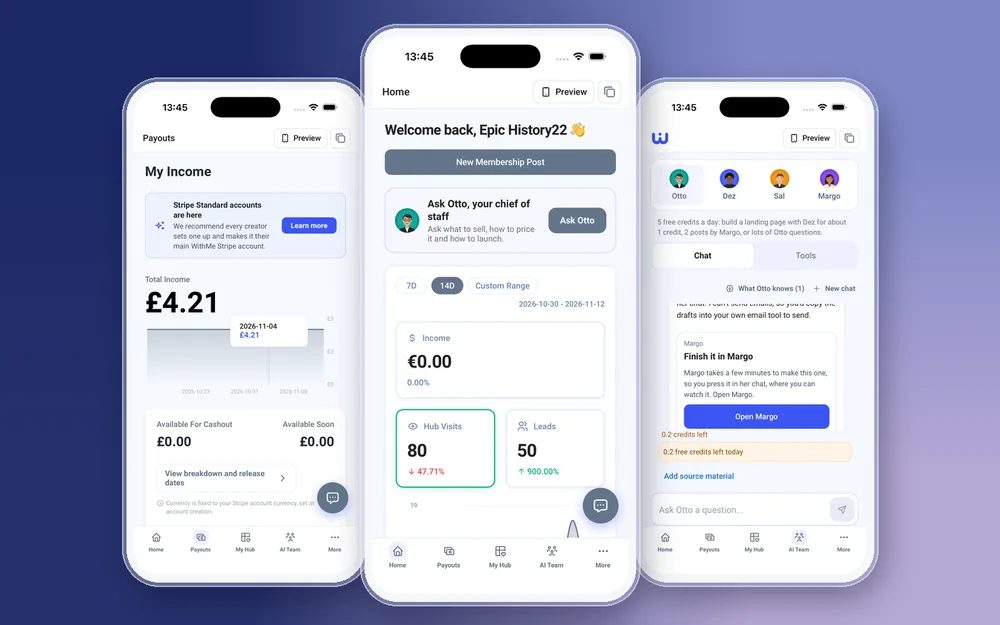
- Sign in with the same account. The creator tabs open automatically: Home, Payouts, My Hub, AI Team and More.


Allow push notifications when the app asks. They tell you about your first sale, new payments, new leads, claims of a free product and visitor-agent leads, and tapping one opens the right screen, which makes the routine faster.
Minutes 1 to 3: check Home and your notifications
Open the Home tab. It shows income, hub visits and leads, and you can switch between 7 days, 14 days or a custom range. Compare today with the last week: a jump in visits with no new leads usually means a page or an offer needs a look.
If you are still setting up, the launch checklist on Home shows what is left before your hub is ready to sell. Tick off one item a day and the hub gets finished without a big setup weekend.
Minutes 4 to 7: answer customers and your community
This is the part customers notice most, so give it the most time.
- Reply to paid DMs. Messages are grouped by product and can carry attachments, so you can send a quick voice note, PDF or image back.
- Open your community, answer new questions, and moderate any comments that need it.
- Check Customers for new applications and requests, and approve or reply to them.
- If you coach 1:1, glance at each client's feed and goals in the coaching workspace, and check today's calls in the Calendar.
Minutes 8 to 10: ask Sal who to follow up
Open the AI Team tab and go to Sal. Sal sorts your warm leads, hot leads and visitors, so you can see who is closest to buying. Pick two or three people and follow up with them personally.
If you are unsure what to promote this week, ask Otto instead. Otto is your chief of staff for what to sell, how to price it and how to plan a launch.
Minutes 11 to 13: post or schedule something
Put one thing in front of your audience. Write a community post, schedule a membership post with a photo or short video from your camera roll, or add a lesson to a course. Uploads go straight from your phone, and long videos upload in chunks.
If you have a broadcast email planned, write it in Email Marketing and send or schedule it. On a post day, check that your Instagram Auto DM is live, so people who comment your keyword get your link by DM.
Minutes 14 to 15: check Payouts and plan tomorrow
Finish on the Payouts tab: income, the chart over time and the amount available for cashout. Cash out when you want to. WithMe takes 0% commission on your sales, and Stripe or PayPal fees still apply. Then make a one-line note of what tomorrow's routine should start with.
What should you do weekly instead of daily?
Some jobs work better once a week, still from your phone.
- Read the Insights reports: Overview, Sales, Audience, Content and Marketing.
- Review your email sequences and automated emails, and plan the week's broadcasts.
- Create or refresh a promo code for the week's offer.
- Tidy My Hub: reorder products, adjust the design, and use Preview to see the hub as a visitor or customer does.
What is better left for the laptop?
Billing, plan changes and buying AI credits are done on the web, and so is going live, though you can schedule a live post and watch in the app. Dez's full page builder, Margo, and integrations such as API keys, webhooks, pixels and connecting Zoom or Google Meet are web jobs too. They are occasional, so they rarely belong in a daily routine.
Creator routine questions
How long should a daily creator routine take?
Fifteen minutes is enough for most hubs: three on stats, four on customers, three on leads, three on content and two on payouts. Spend longer on customers on busy days.
Can I run my whole creator business from my phone?
Most of it. The WithMe creator app on iOS and Android covers products, customers, community, email, Auto DMs, insights and payouts. Sign-up, billing and a few setup jobs are done on the web.
Do I need to sign up on the web first?
Yes. Start your 14-day trial on the WithMe sales page at withme.so/become-a-creator, then download the app and sign in with the same account.
What should I do if I only have five minutes?
Answer customers first. Reply to paid DMs and new community questions, then check Home for anything unusual. Leads and content can wait until tomorrow.
How much does WithMe cost?
WithMe is $25 per month billed annually (UK £25), with a 14-day trial and 0% WithMe commission on sales. Stripe and PayPal fees still apply.
Start your 14-day trial at https://www.withme.so/become-a-creator.