A membership site app lets you run a paid membership from your phone instead of a laptop. With WithMe: The Creator App on iPhone or Android, you can set up tiers, post new content, schedule next week's posts, answer comments and see who joined, all in a few minutes between other things.
Memberships live on regular content. The hard part is rarely the idea, it is posting every week. Doing it from the phone you already film on removes the step of moving files to a computer and logging in to a dashboard.
What is a membership site app?
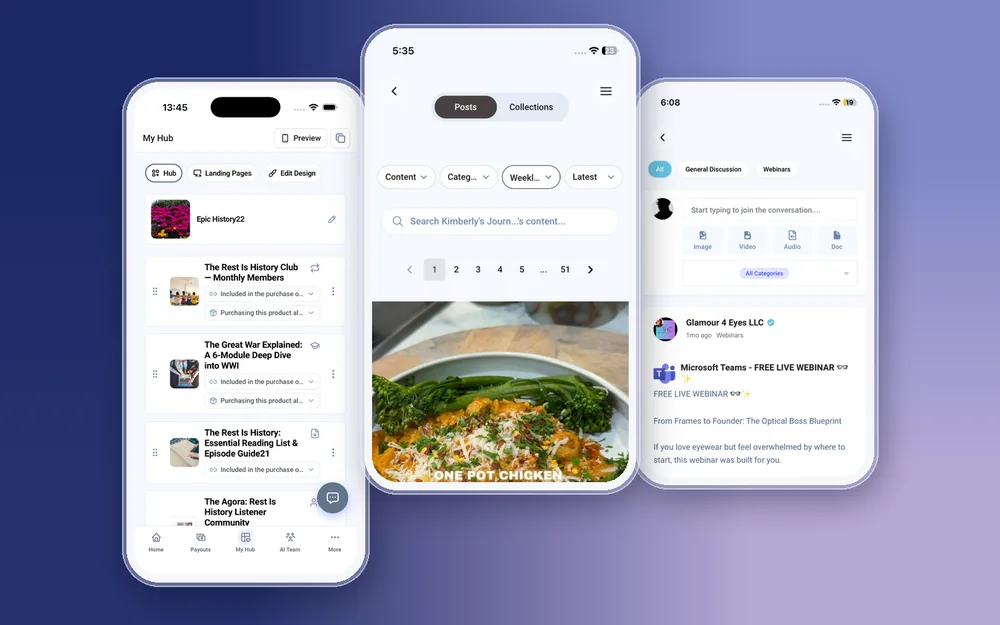
There are two sides. Members need an app to read, watch and comment. You need an app to publish, manage and get paid. WithMe covers both with one app on iOS and Android: members sign in and see your content, and a creator account opens the creator side automatically, with Home, Payouts, My Hub, AI Team and More along the bottom. You publish from the same app your members read in, which makes it easy to check how a post looks to them.
What can you run from the membership site app on iPhone and Android?
Everything below works natively in the app on both platforms:
- Create, edit and delete memberships and their tiers, with pricing and checkout questions.
- Write posts with text, video, audio, images and PDFs, uploaded from your phone. Large videos upload in chunks.
- Schedule posts for later and group them into collections.
- Run a community alongside the membership: posts, categories and comment moderation.
- Message members in paid DMs, with attachments.
- See members in Customers, add one by hand, import a CSV and create promo codes.
How do you set up membership tiers on your phone?
Open My Hub, add a product and choose membership. Then:
- Name the membership and write a short description of what members get each week or month.
- Add your tiers, for example a basic tier for the content library and a higher tier that adds a monthly group call or direct messages.
- Set a price for each tier and add any checkout questions you want answered when someone joins.
- Tap Preview to see the page as a visitor, then as a member, before you share it.
How do you post to members from your phone?
Write a post in the app and attach what you just recorded: a video, a voice memo as audio, a few photos or a PDF worksheet. Choose which tier can see it, then publish now or schedule it.
Scheduling is what makes a phone workflow last. Record three posts on a quiet afternoon, schedule them a week apart, and the membership keeps moving while you are busy. Collections group related posts, such as a four-week series, so new members can find them in order.
How do you keep a membership community active from the app?
Many memberships pair content with a community. In the app you can post to the community, organise it into categories and moderate comments, so a question gets an answer the same day rather than the next time you open a laptop. Paid DMs give higher-tier members a private line to you, per product, with photos or files attached. Categories also help members find older threads, so the same question is not asked every week.
How do you keep members from cancelling?
Retention is mostly consistency and attention. The app helps with both:
- Schedule content ahead so there is never a quiet week.
- Set up an email sequence that welcomes new members and points them to the best posts, from Email Marketing under More.
- Check the Content report in Insights to see what members actually open, and make more of it.
- Turn on push notifications for payments and new leads, so you notice a sign-up while it is fresh and can say hello.
What do your members see?
Members use the WithMe app on iOS and Android, included with every hub at no extra cost. They read posts, watch videos, listen to audio and join the community from their phone. If you want an app with your own name and icon in the stores, a fully branded app is a paid extra.
What still happens on the web?
Signing up and starting the trial, billing and plan changes, buying AI credits, the broadcast itself if you go live, and integrations such as webhooks and tracking pixels are done on the web. You can schedule a live post and watch it in the app.
How to get started with the membership site app
The app's creator side needs a WithMe account first, so start on the web:
- Go to the WithMe sales page at withme.so/become-a-creator and start your 14-day trial.
- Download WithMe: The Creator App from the App Store on iPhone or Google Play on Android.
- Sign in with the same account. The creator tabs open, and you can create your membership from My Hub.


What does the membership site app cost?
The app comes with WithMe, which is $25 per month billed annually (UK £25), with a 14-day trial and 0% WithMe commission on membership payments. Stripe and PayPal fees still apply. More than 8,000 creators use WithMe, and the price stays the same at 10 members or 1,000.
Membership site app questions
Can I run a membership site entirely from my phone?
Day to day, yes. Tiers, posts, scheduling, community moderation, member messages and payouts all work in the WithMe app on iOS and Android. Signing up, billing and integrations are done on the web.
Can I upload long videos from my phone?
Yes. Video, audio, PDFs and images upload from your phone, and large files upload in chunks so a long video does not need a computer.
Can I schedule membership posts in the app?
Yes. Write a post, choose the tier, and pick a date and time. You can also group posts into collections.
Do my members need a separate app?
No. Members use the WithMe app on iOS and Android, included with every hub. A fully branded app in your own name is available as a paid extra.
Does WithMe take a percentage of membership revenue?
No. WithMe takes 0% commission. The plan is $25 a month billed annually, and Stripe or PayPal fees apply to each payment.
Start your 14-day trial at https://www.withme.so/become-a-creator.