Most coaching apps for iOS and Android are built for your clients. WithMe: The Creator App is built for you, the coach. From an iPhone or Android phone you can sell 1:1 coaching and group calls, talk to clients, check your calendar, join calls and cash out what you have earned.
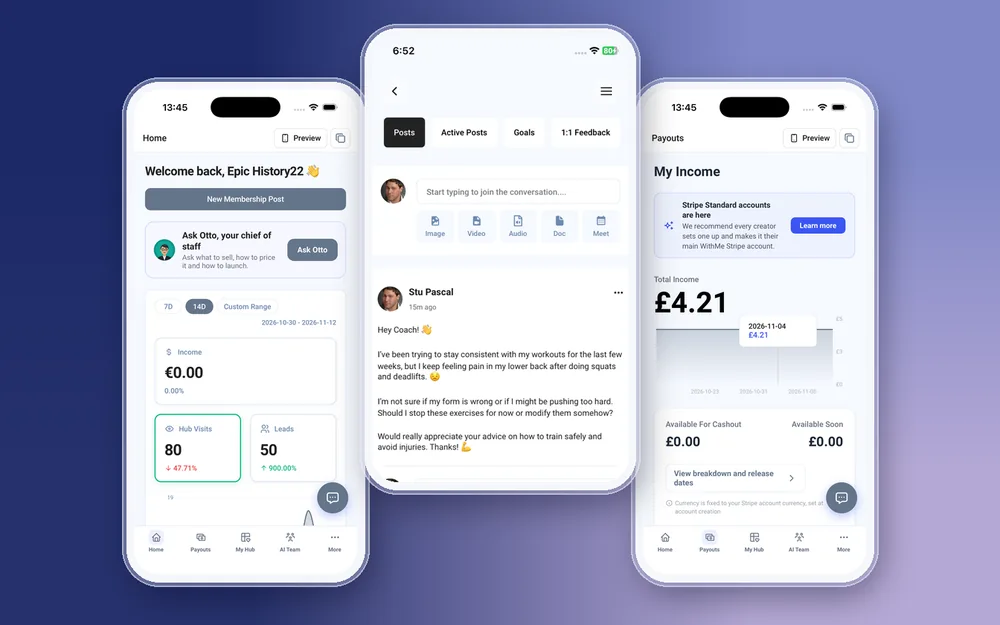
It is the same app your clients use. When you sign in with a creator account, the creator side opens on its own, with five tabs along the bottom: Home, Payouts, My Hub, AI Team and More. Nothing to switch, and no second app to install.
What can a coach do in the WithMe app on iOS and Android?
The coaching parts of your business all work natively in the app, on iPhone and on Android:
- Create, edit and delete 1:1 coaching, coaching calls and webinars, with pricing and checkout questions.
- Run each client's 1:1 coaching workspace: the feed, their goals and their application.
- Message clients in paid DMs, per product, with attachments.
- See your coaching calendar by day, week or month, set your availability and join calls in Zoom or Google Meet.
- Check income, hub visits and leads on Home, and cash out from Payouts.
- Ask Otto, your AI chief of staff, what to sell next, how to price it and how to launch it.
How do you set up a coaching offer from your phone?
Open My Hub and add a product. A coaching offer takes a few minutes:
- Choose the type: 1:1 coaching for private clients, coaching calls for groups, or a webinar for a one-off session.
- Write the title and description, and upload a cover image straight from your phone.
- Set the price and add checkout questions, such as a client's goals or current routine, so you know who is joining before the first call.
- Reorder it on your hub, then tap Preview to see the page as a visitor sees it before you share the link.
How do you manage coaching clients on your phone?
Every 1:1 client gets a coaching workspace with a feed, their goals and their application answers. You can post an update, check a goal or read a new application between sessions, without opening a laptop.
Paid DMs keep the conversation in one place for each product. Clients can send a question with a photo or a PDF, and you reply from the same thread. Under More, Customers lists everyone who has bought, along with applications and requests, and you can add a client by hand or import a CSV.
How do bookings and calls work in the coaching app?
Calendar, under More, shows your booked sessions by day, week or month. Set the hours you are available and clients book into those slots from your hub. When it is time for a call, tap to join it in Zoom or Google Meet.
Connecting Zoom or Google Meet to your account is done once on the web. After that, your calendar, availability and calls all work on the phone.
How do you get paid and see payouts?
The Payouts tab shows your income, a chart over time and the amount available to cash out. Tap cash out and the money goes to your bank through Stripe. The first time, Stripe's own sign-up opens in a browser so you can verify your details.
WithMe takes 0% commission on your coaching sales. Stripe and PayPal processing fees still apply. Home shows income, hub visits and leads for the last 7 days, 14 days or a custom range, and Insights breaks it down into sales, audience, content and marketing reports.
Which notifications does a coach get?
Push notifications tell you when something needs you, and tapping one opens the right screen:
- Your first sale, and each payment after it.
- A new lead, such as someone joining your email list.
- A free product claimed, when someone signs up for one of your freebies.
- A lead captured by your visitor agent while you were busy with a client.
What still needs the web?
A few things are web-only: creating your account and starting the trial, billing and plan changes, buying AI credits, connecting Zoom or Google Meet, and integrations such as webhooks and tracking pixels. Everything you do with clients day to day works in the app.
How to get started with the coaching app
You need a WithMe account before the app's creator side can open, so start on the web:
- Go to the WithMe sales page at withme.so/become-a-creator and start your 14-day trial.
- Download WithMe: The Creator App from the App Store on iPhone or Google Play on Android.
- Sign in with the same account. The creator tabs open, and you can add your first coaching offer from My Hub.

What does the WithMe coaching app cost?
The app is included with WithMe, which is $25 per month billed annually (UK £25), with a 14-day trial and 0% WithMe commission on sales. More than 8,000 creators use WithMe. Your clients get the WithMe app on iOS and Android with every hub at no extra cost. A fully branded app in your own name is a paid extra.
Coaching app questions
Is there a coaching app for both iPhone and Android?
Yes. WithMe: The Creator App is on the App Store and Google Play. The coaching features are the same on both: offers, client workspaces, paid DMs, the calendar, calls and payouts.
Can I sell 1:1 coaching and group calls from the app?
Yes. You can create 1:1 coaching, coaching calls and webinars in the app, set the price and checkout questions, and publish them to your hub.
Can clients book a session and join a call from their phone?
Yes. Clients book into your available slots from your hub and use the WithMe app on iOS or Android, included with every hub. You join the same call from your calendar in Zoom or Google Meet.
Do I need a computer at all?
Only for a few steps: signing up and starting the trial, billing, buying AI credits and connecting Zoom or Google Meet. Running your coaching day to day works on the phone.
Does WithMe take a cut of my coaching income?
No. WithMe takes 0% commission. You pay $25 a month billed annually, and Stripe or PayPal processing fees apply to each payment.
Start your 14-day trial at https://www.withme.so/become-a-creator.