If you are looking for a Teachable app for creators, the short answer is that Teachable's mobile app is built for students. Teachable's own guide says admins cannot manage schools or courses in it. We checked Teachable's pages on 16 November 2026.
This guide explains what the Teachable app does, what course creators do instead, and how WithMe: The Creator App lets you build and sell a course from an iPhone or Android phone.
What does the Teachable app do?
Teachable's mobile app page says the app runs on iPhones and iPads with iOS 16 or later and on Android phones and tablets with Android 11 or later. It is free to creators and students, and courses built on Teachable appear in it without extra setup.
That is a fair deal for your students. They can open your course on their phone and watch lessons on the go, and you do not need to configure anything. If your business is mostly courses and you are happy to build them at a desk, the student app may be all the mobile you need.
Can creators manage a Teachable school from the app?
No. Teachable's iOS app guide for creators says the app is designed for student use only and that admins cannot manage schools or courses via the app. Teachable's Android guide is written for students too. The guide also lists what the app does not show:
- Coaching products.
- Digital downloads.
- Memberships.
- Community.
So the app shows courses to students. Building lessons, changing prices, and handling coaching or downloads all happen on Teachable's website.
What do Teachable creators do on mobile instead?
Without a creator app, school management on Teachable happens on its website, whether you open it on a laptop or in your phone's browser. That works for quick checks. But if you film lessons on your phone, launch between client sessions or run your business while travelling, the gap shows quickly: you record on the phone, then wait until you are back at a computer to turn it into a lesson. If you want to build and run courses from your phone, you need a platform whose creator app is made for that.
Can you build a course in the WithMe app?
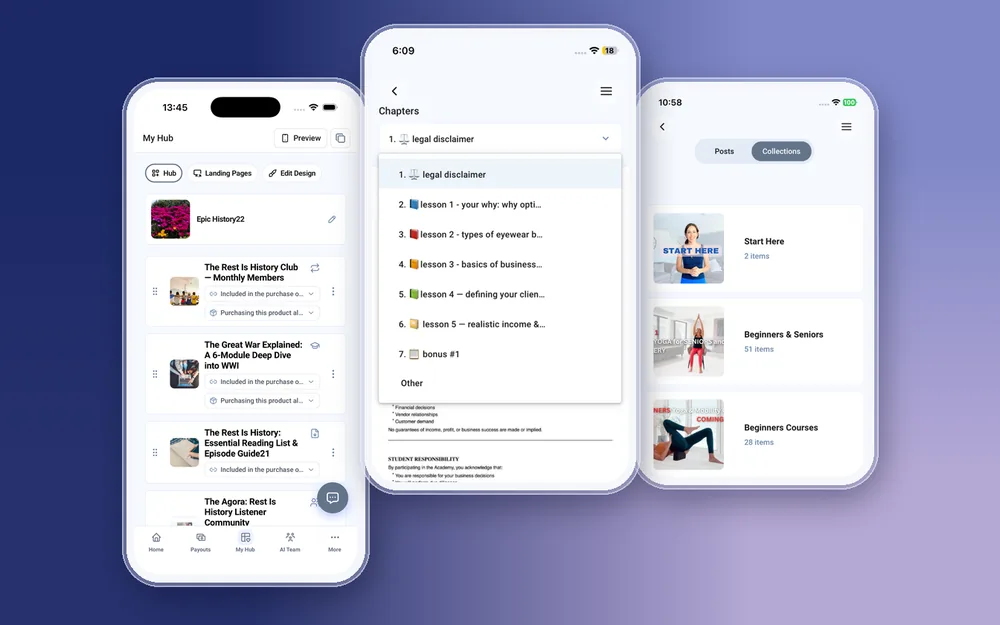
Yes. WithMe: The Creator App is on the App Store and Google Play, and course building works natively on both. From My Hub you can:
- Create a course and add chapters and lessons.
- Upload lesson videos, audio, PDFs and images from your phone. Large files upload in chunks.
- Set a drip schedule so lessons unlock over time.
- Reorder chapters and lessons.
- Set the price and add checkout questions.
- Tap Preview to see the course the way a customer sees it.
What else can course creators sell from the app?
Courses sit alongside every other product type on WithMe, and you can create all of them in the app: memberships, digital products, 1:1 coaching, coaching calls, webinars, communities and lead captures. That matters if you want to add a coaching tier or a downloadable workbook next to a course, which Teachable's app does not show to students. From the same app you can email your students with broadcasts and sequences, check income, hub visits and leads on Home, and cash out from Payouts.
Do your students get an app too?
Yes. The same WithMe app serves creators and customers, and your students get it on iOS and Android with every hub, at no extra cost. A creator account opens the creator side automatically, with tabs for Home, Payouts, My Hub, AI Team and More, so you never switch between two apps. Push notifications tell you about sales, payments and new leads, and tapping one opens the right screen. A fully branded app in your own name is a paid extra.
What still needs the web?
A few things are web-only on WithMe: creating your account and starting the trial, billing and plan changes, buying AI credits, and integrations such as webhooks and tracking pixels. Building and running your courses works in the app.
How to get started
You need a WithMe account before the app's creator side can open, so start on the web:
- Go to the WithMe sales page at withme.so/become-a-creator and start your 14-day trial.
- Download WithMe: The Creator App from the App Store on iPhone or Google Play on Android.
- Sign in with the same account. The creator tabs open, and you can add your first course from My Hub.

What does WithMe cost?
The app is included with WithMe, which is $25 per month billed annually (UK £25), with a 14-day trial and 0% WithMe commission on sales. Stripe and PayPal fees still apply. More than 8,000 creators use WithMe.
Teachable app questions
Is there a Teachable app for creators?
Teachable's app is designed for students. Its iOS guide for creators says admins cannot manage schools or courses via the app (checked 16 November 2026).
Is the Teachable app on Android?
Yes. Teachable says the app runs on Android 11 or later and iOS 16 or later, and it is free to creators and students.
Can I sell coaching or digital downloads in the Teachable app?
Teachable's guide says the app only displays courses, so coaching products, digital downloads, memberships and community are not shown in it.
Can I build a course on my phone with WithMe?
Yes. In WithMe: The Creator App on iPhone or Android you can add chapters and lessons, upload videos, set a drip schedule, reorder lessons and set the price.
How do I move my courses from Teachable to WithMe?
Start your trial on the WithMe sales page, then recreate your courses in the app or on the web. Our Teachable migration guide covers each step.
Start your 14-day trial at https://www.withme.so/become-a-creator.